How do I install Simple Tweaks in FFXIV?
Open the Dalamud plugin installer with /xlplugins, search for Simple Tweaks Plugin, review the listing, and install it in game.
Dalamud plugin guide
Simple Tweaks is a maintained Dalamud plugin that groups many optional quality-of-life changes into one interface. Install it from the in-game plugin installer, enable only the changes you understand, and avoid standalone DLL downloads from unofficial mirrors.
Launch FFXIV with XIVLauncher, open the Dalamud plugin installer with /xlplugins, search for Simple Tweaks Plugin, and choose Install. You do not need a custom repository URL or a separately downloaded DLL for the normal setup.
After installation, open the plugin settings and turn on one tweak at a time. Most options are disabled by default, which makes it easier to understand what changed and reverse a setting if the interface behaves unexpectedly.
Freshness check on July 23, 2026: the maintained Caraxi repository reports project version 1.15.0.7 and has no GitHub Releases. XIVLauncher remains 7.0.20, published December 6, 2025. The stable XIVLauncher installer link still points through the official GitHub latest-release route.
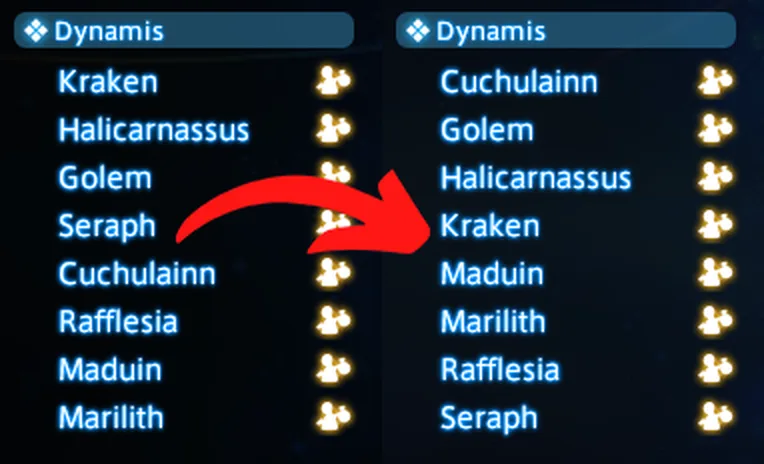
Official preview
The official Sort World List preview shows the type of focused change Simple Tweaks provides: a familiar game screen with a more useful ordering. The plugin is not a visual overhaul and does not require enabling every available option.
Use previews and descriptions as a starting point, then confirm the result in your own UI scale, language, controller mode, and monitor layout.
| Category | What it can improve | Good first check | Reason to be cautious |
|---|---|---|---|
| Tooltip tweaks | Adds useful context to item, action, or status tooltips. | Food stat details or other clearly readable information. | Dense tooltips can become harder to scan at small UI scale. |
| UI adjustments | Changes layout direction, visibility, ordering, or small HUD behavior. | A reversible ordering or growth-direction option. | Several layout changes together can make troubleshooting confusing. |
| Chat and text | Improves timestamps, formatting, names, or message presentation. | One formatting change that solves a specific readability issue. | Privacy or logging behavior should be reviewed before streaming. |
| Target and combat information | Adds or clarifies values used during combat. | Only information you can interpret without distraction. | Extra data can clutter the HUD and is still third-party functionality. |
| Quality-of-life actions | Reduces repetitive interface friction. | A convenience option with an obvious on/off result. | Avoid options you cannot explain or that imitate automation. |
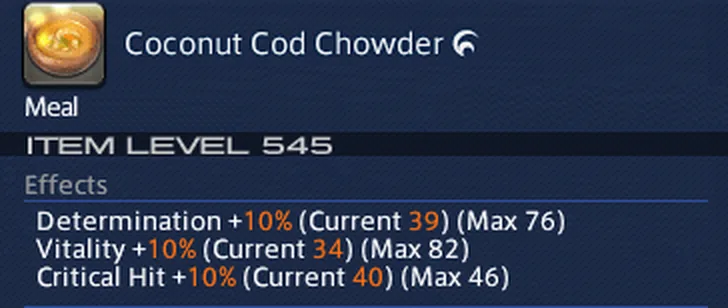
Tooltip example
The official food-tooltip preview adds clearer current and maximum stat values. This is a useful model for choosing tweaks: enable information that answers a question you already have instead of filling every available screen area.
If a tooltip becomes too wide, overlaps other UI, or is difficult to read in your language, disable that tweak before changing unrelated game settings.
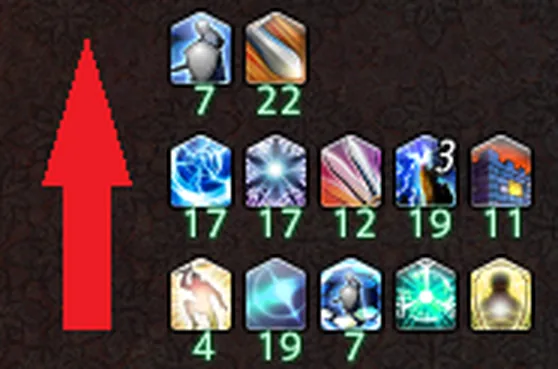
HUD example
Buff List Vertical Growth changes the direction in which status icons expand. A small setting like this can solve a real HUD collision, but the best direction depends on your own hotbars, party list, resolution, and controller layout.
Take a screenshot of your original layout or remember the default before changing several HUD-related tweaks. Simple rollback is more valuable than a large preset copied from another player.
Let Dalamud manage normal plugin updates. Simple Tweaks does not publish normal user releases on its GitHub Releases page, so a missing ZIP or DLL release is not a reason to search for a mirror. The maintained repository is useful for source, change history, and issue context; installation remains an in-game workflow.
After a major FFXIV update, XIVLauncher may start while Dalamud or individual plugins remain unavailable. Wait for maintained compatibility updates. Do not copy an old plugin binary into devPlugins, edit manifests to bypass API checks, or disable security controls globally.
When a specific tweak changes after an update, disable that tweak first rather than uninstalling the whole launcher. This preserves a clear diagnostic path and avoids changing the game installation itself.
| Problem | Likely cause | Safe first action |
|---|---|---|
| Simple Tweaks is missing | Dalamud is unavailable after a patch, the plugin is disabled, or the installer filter hides it. | Confirm Dalamud status, clear installer filters, and wait for maintained compatibility. |
| A tweak stopped working | FFXIV UI data or the plugin implementation changed. | Disable only that tweak, update through Dalamud, and check the maintained repository. |
| The UI overlaps or looks wrong | Multiple tweaks or HUD settings affect the same area. | Turn off the newest layout tweak and test at the normal UI scale. |
| Settings reset | Configuration was not saved cleanly or a profile/file was replaced. | Exit normally, avoid manual config-file copying, and re-enable a small set deliberately. |
| A download site offers a DLL | The file is outside the standard installation flow. | Do not download it; use /xlplugins and the official repository only for verification. |
XIVLauncher, Dalamud, and Simple Tweaks are third-party community software, not Square Enix products. Their availability, compatibility, and features can change, and this guide cannot guarantee account safety.
Use the official FFXIV launcher if you need the lowest-risk supported route. Do not use tweaks to automate play, evade rules, harass players, expose private information, or misrepresent third-party UI as an official game feature.
Open the Dalamud plugin installer with /xlplugins, search for Simple Tweaks Plugin, review the listing, and install it in game.
No for the normal stable installation. It is available through the standard Dalamud plugin installer.
Normal users should not download a standalone DLL. The maintained repository has no GitHub Releases, and the supported workflow is the in-game plugin installer.
There is no universal preset. Start with one tooltip, ordering, or layout improvement that solves a specific issue and test it before enabling more.
Dalamud or the plugin may be temporarily disabled while compatibility is updated. Wait for maintained updates instead of forcing an old build.
It is maintained open-source community software, but it remains third-party. Verify the in-game listing and repository, keep the plugin updated, and understand FFXIV policy and account risks.