Official source
Verify xivdev/Penumbra and its README.
FFXIV runtime mod guide
Penumbra is a Dalamud plugin that loads supported FFXIV mod files at runtime without replacing the original game files. The safer setup is the custom plugin repository method documented by the project—not manually unpacking a release ZIP.
Open XIVLauncher, enter the game, run /xlsettings, and add the official Penumbra repo.json URL under the Experimental custom plugin repositories area. Then install Penumbra from /xlplugins so Dalamud can manage updates.
The official README explicitly warns against manually unpacking a release ZIP into devPlugins. Manual copies can miss update notifications and conflict with the repository-managed installation.
Freshness check on July 22, 2026: the latest GitHub release is testing_1.7.0.2, published July 20, 2026. This guide does not offer the ZIP as a download CTA because the maintained README recommends the repository method.

FFXIV runtime mod guide
This is the icon stored in the xivdev/Penumbra repository. Use the repository owner, README, issue tracker, and repo.json address together to verify the project instead of trusting a similarly named file host.
Penumbra is community software, not an official Square Enix feature. Its runtime approach avoids permanently overwriting game archives, but it does not remove account-policy, privacy, compatibility, or mod-source risks.
The repository route keeps ownership, updates, and rollback clearer than a manually copied plugin folder.
Verify xivdev/Penumbra and its README.
Add the official repo.json in /xlsettings.
Install and update through /xlplugins.
Enable one trusted mod and check conflicts.
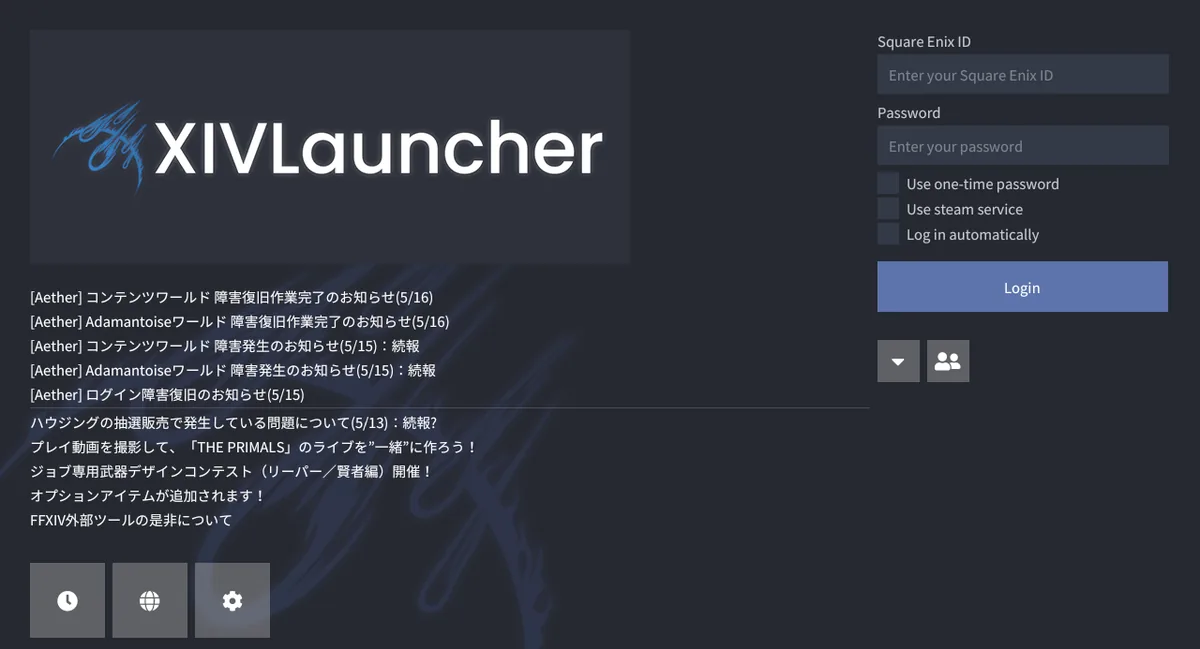
XIVLauncher + Dalamud + Penumbra
XIVLauncher starts FFXIV and initializes Dalamud; Penumbra is then installed and managed as a Dalamud plugin. You do not need a separate launcher, injector bundle, or modified game executable to use the supported Penumbra setup.
The screenshot is official Goatcorp media for XIVLauncher, not a Penumbra settings screenshot. It illustrates the user-facing launcher layer so readers do not confuse the plugin with a standalone game client.
| Problem | Likely cause | First check |
|---|---|---|
| Penumbra missing from /xlplugins | Repository URL was not saved or Dalamud has not refreshed | Reopen /xlsettings, verify the exact repo.json URL, save, and refresh the plugin list |
| Plugins unavailable after a game update | Dalamud compatibility is temporarily gated for the new FFXIV build | Wait for maintained updates; do not force old plugin binaries into the game |
| A mod does not appear | Collection assignment, priority, or file path does not match the current character | Check the active collection and use Penumbra conflict tools before reinstalling |
| Textures or models look mixed | Two enabled mods replace the same files | Inspect conflicts and move the intended mod higher in priority |
| Long loading or large disk use | Oversized mod library, cache growth, or slow storage | Disable recent additions, review cache paths, and keep the mod directory on healthy local storage |
| Duplicate plugin behavior | Manual devPlugins copy conflicts with repository installation | Remove the manual copy and keep only the plugin-manager installation |
Disable the newest mod first, then test the same character, collection, zone, and equipment state. Changing several variables at once makes a conflict harder to isolate.
Do not delete FFXIV archives, replace game executables, disable antivirus globally, or download repacked plugin bundles. Penumbra is designed to keep mod files separate from the original installation; preserve that boundary.
After a major FFXIV patch, Dalamud and plugins may remain unavailable until compatibility work is complete. A temporary unavailable message is not proof that your install is broken. Check maintained project channels and wait rather than forcing old builds.
XIVLauncher, Dalamud, Penumbra, and mods are third-party tools. Square Enix does not provide support for them, and no guide can guarantee account safety. Use the official game client if you need the lowest-risk path.
Only import mod files from sources you understand. Avoid archives that include executables, credential prompts, broad security exclusions, or unclear ownership. Respect creator permissions and do not use visual modifications to impersonate official content.
No. Dalamud is the plugin framework loaded through XIVLauncher; Penumbra is one plugin that manages runtime mod replacements.
Not for the normal setup. The official README recommends adding the repo.json URL and installing through Dalamud so updates are managed automatically.
Dalamud may temporarily disable plugins while compatibility is checked. Wait for maintained updates and avoid forcing an older binary.
Use a dedicated writable folder outside the FFXIV installation and protected system folders, on local storage with enough free space.
Use Penumbra conflict information and collection priorities. Keep only the intended replacement active or move it above the competing mod.
It is open community software with an official repository, but it remains third-party and mod files add separate source, privacy, compatibility, and account-policy risks.